Best 3D Printer Tools and Accessories (2026): What to Buy First
By Chris Avery, Publisher / Editor
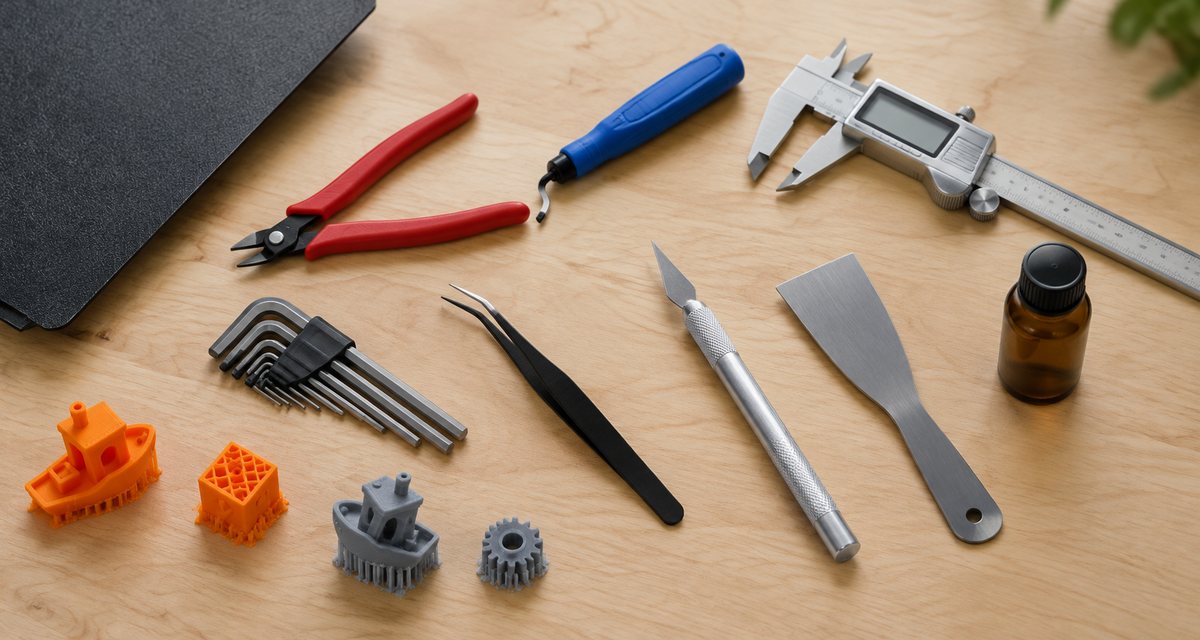
The best 3D printer tools and accessories are not the ones in a 74-piece kit. They are the five or six things you will pick up after almost every print: something to cut filament and supports, something to clean edges, something to measure with, something to clean the build plate, and keys that do not round off screws. This guide explains what each tool does, which specific models are worth buying, when a kit makes more sense, and what you can skip.
Quick Answer
The 3D printer tools worth buying first are flush cutters (the Hakko CHP-170), isopropyl alcohol for the build plate, a swivel deburring tool (the Noga Burr 3), a digital caliper (the iGaging Absolute Origin) and a proper set of metric hex keys. Buy an all-in-one kit only if your printer shipped with almost no tools.
Amazon buttons open Amazon.com search results for that exact product name in a new tab, not a single product page. Results can include multipacks, variants and similar items, so match the brand and model before you buy. Amazon affiliate links. As an Amazon Associate I earn from qualifying purchases.
TL;DR — Quick Summary
Best 3D Printer Tools — 2026 Picks
- 1✂️ First tool to buy: Hakko CHP-170 flush cutters — clean, flush cuts on filament and supports
- 2🪒 Clean edges: Noga Burr 3 deburring tool — removes elephant's foot and brim lips
- 3📏 Measuring: iGaging Absolute Origin caliper — keeps zero when switched off
- 4🧴 Plate cleaning: MG Chemicals 824 99.9% isopropyl alcohol
- 5🔧 Hex keys: Wera 950/9 Hex-Plus (premium) or Bondhus 12199 (value)
- 6🧰 All-in-one: Creality 74 Pcs kit if your printer came with almost nothing
What is Flush Cutter?
Flush Cutter A small side cutter whose blades are ground flat on one face, so it cuts filament and plastic supports level with the surface instead of leaving a pointed stub. It is the most-used hand tool in FDM 3D printing.
🖨️ Still choosing a printer?
Our beginner guide compares six current printers by setup, size, enclosure and budget, and explains which tools each one ships with.
3D Printer Tools Compared
Every tool below solves one specific job. Details come from each maker's own specifications or the product's Amazon.com listing, checked on November 19, 2026. We do not publish prices because they change daily on Amazon; the buttons open current listings.
Flush cutters
Hakko CHP-170 Micro Cutter
Snipping filament ends before loading, cutting brims and skirts, and clipping support nubs flush with the surface.
Read why we picked it →Flush cutters (fine work)
Xuron 170-II Micro-Shear Flush Cutter
Fine trimming of thin supports, sprue-style gates and small details where a bigger cutter would crush the part.
Read why we picked it →Deburring tool
Noga NG1003 Burr 3 Deburring Tool
Shaving the elephant's foot off first layers, cleaning brim edges and chamfering the inside of printed holes.
Read why we picked it →Digital caliper
iGAGING Absolute Origin 0-6" Digital Caliper
Checking calibration cubes, measuring filament diameter, sizing holes for screws and inserts, and modeling replacement parts.
Read why we picked it →Build plate cleaner
MG Chemicals 824 99.9% Isopropyl Alcohol
Wiping fingerprints and skin oil off a PEI or smooth build plate between prints so the first layer sticks.
Read why we picked it →Hex keys (premium)
Wera 950/9 Hex-Plus Metric L-Key Set
Tightening frame bolts, adjusting eccentric nuts, swapping hot ends and tensioning belts.
Read why we picked it →Hex keys (value)
Bondhus 12199 Hex L-Wrench Set
The same jobs as the Wera set, with long arms that reach recessed screws on frames and hot ends.
Read why we picked it →Precision tweezers
Hakko CHP 7-SA Precision Tweezers
Pulling strings and blobs off a cooled nozzle, picking support debris out of holes, and placing small parts and nuts.
Read why we picked it →Hobby knife
X-ACTO #1 Precision Knife
Scraping seams, trimming stubborn support scars and cleaning up details that a deburring tool cannot reach.
Read why we picked it →All-in-one kit
Creality 74 Pcs 3D Printer Tool Kit
Covering print removal, cleanup, nozzle cleaning and printer maintenance with one purchase.
Read why we picked it →All-in-one kit (cleanup focus)
AMX3d Pro Grade Plus 3D Printer Tool Kit
Removing prints and finishing them: support removal, scraping, picking and detail work.
Read why we picked it →Check What Came in the Box
Before you buy anything, open the accessory bag that came with your printer. Most current machines ship with a small spatula or scraper, the hex keys needed for assembly, a spare nozzle or a nozzle-cleaning needle, and sometimes a basic pair of side cutters and a glue stick. Budget printers that need assembly tend to include more tools; mostly assembled machines include fewer, because there is less to put together.
Those included tools are enough to get your first prints off the plate. What they are not is good. The hex keys are soft and round off screw heads, the cutters crush rather than slice, and the spatula is often too thick to slide under a stuck print without gouging a PEI sheet. That is why the first upgrade most people make is a real pair of flush cutters, and why this guide starts there.
Upgrade first
Cutters. You use them on every print, and the included ones are usually the weakest tool in the bag.
Add soon
A deburring tool and a caliper. Neither comes in the box, and both change how finished your prints look and fit.
Add when needed
Better hex keys, tweezers and a hobby knife, once you start maintaining the printer or finishing prints for display.
Day-One Essentials
These are the tools that solve the problems every new printer owner hits in the first month: supports that will not come off cleanly, first layers with a flared edge, parts that do not fit, and prints that stop sticking to the plate. Buy the flush cutters and plate cleaner first, then the deburring tool and caliper.
Flush cutters
Hakko CHP-170 Micro Cutter
The job: Snipping filament ends before loading, cutting brims and skirts, and clipping support nubs flush with the surface.
Flush cutters are the tool you will reach for after almost every print, and the CHP-170 is a long-established, widely sold option. Hakko describes it as a flush-cut tool with very sharp cutting edges and rates it for 16 AWG soft copper wire. In 3D printing terms that means it cuts 1.75 mm filament and support material cleanly, and its flat back face lets you trim a support stub level with the part instead of leaving a spike you then have to sand.
Listed features
- Flush cut, rated by Hakko for soft copper wire up to 16 AWG
- Cutting force listed by Hakko as 5 kg
- Spring-opening handles; often sold on Amazon in 2-, 3- or 10-packs
Watch out for
- Hakko rates it for soft copper only, so never use it on steel wire, hardened nozzles or piano wire
- Fine blades: twisting the cutter on thick supports will nick the edges
Who it suits: Everyone. If you buy one tool from this guide, make it a pair of flush cutters.
Amazon buttons open Amazon.com search results for that exact product name in a new tab, not a single product page. Results can include multipacks, variants and similar items, so match the brand and model before you buy. Amazon affiliate links. As an Amazon Associate I earn from qualifying purchases.
Details from the Hakko USA CHP-170 product page.
Flush cutters (fine work)
Xuron 170-II Micro-Shear Flush Cutter
The job: Fine trimming of thin supports, sprue-style gates and small details where a bigger cutter would crush the part.
Xuron's 170-II uses a bypass Micro-Shear cut rather than two edges meeting, which Xuron says leaves a square, spike-free cut with less effort. It is rated for 18 AWG (1 mm) soft wire, and Xuron lists plastic sprue and plastic de-gating among its intended materials. That makes it the finer, lighter-duty partner to the Hakko: worth adding if you print miniatures, models or anything with thin tree supports.
Listed features
- Micro-Shear bypass flush cut, rated for 18 AWG (1 mm) soft wire
- Xuron lists plastic sprue and de-gating among its materials
- About 5 inches long with an ultra-slim head
Watch out for
- Lighter duty than the Hakko: keep it off thick PETG supports and full 1.75 mm filament
- Xuron states it is not for hardened wire
Who it suits: Miniature, model and cosplay-detail printers who clean up a lot of thin supports.
Amazon buttons open Amazon.com search results for that exact product name in a new tab, not a single product page. Results can include multipacks, variants and similar items, so match the brand and model before you buy. Amazon affiliate links. As an Amazon Associate I earn from qualifying purchases.
Details from the Xuron 170-II product information.
Deburring tool
Noga NG1003 Burr 3 Deburring Tool
The job: Shaving the elephant's foot off first layers, cleaning brim edges and chamfering the inside of printed holes.
A swivel deburring tool is the fastest way to make a print look finished. Drag the blade along an edge and it peels away the flared first layer, leftover brim and stringy lips in one pass, and the swivel lets it follow curves. The Burr 3 is Noga's heavy-duty kit: an NG-1 handle with three S-type blades, including the S10 that Noga lists for steel, aluminium and plastic, and the handle stores spare blades inside it.
Listed features
- NG-1 handle with S10, S20 and S35 heavy-duty swivel blades
- Noga lists the S10 blade for steel, aluminium and plastic
- Spare blades store inside the handle's removable end cap
Watch out for
- Noga warns that blades are sharp and can break; wear safety glasses
- Light, even pressure works best; pressing hard makes the blade dig in
Who it suits: Anyone who prints functional parts with holes, or who wants first layers without a flared edge.
Amazon buttons open Amazon.com search results for that exact product name in a new tab, not a single product page. Results can include multipacks, variants and similar items, so match the brand and model before you buy. Amazon affiliate links. As an Amazon Associate I earn from qualifying purchases.
Details from the Noga Burr 3 (NG1003) data sheet.
Digital caliper
iGAGING Absolute Origin 0-6" Digital Caliper
The job: Checking calibration cubes, measuring filament diameter, sizing holes for screws and inserts, and modeling replacement parts.
The moment you design a part, print a replacement or try to understand why something will not fit, you need a caliper. The Absolute Origin keeps its zero reference when it is switched off, so you are not re-zeroing every time you pick it up, and iGaging lists an IP54 rating against dust and splashes, inch and metric modes, a data output port and a storage case. For hobby 3D printing that covers every measurement you will take.
Listed features
- 0-6 inch (0-150 mm) stainless steel caliper
- Absolute origin: retains its zero reference when switched off
- IP54 dust and moisture protection, inch/metric modes, SPC/USB output, case
Watch out for
- Amazon lists several iGaging caliper variants; match the exact model name before buying
- A caliper measures a print; it does not fix a badly calibrated printer by itself
Who it suits: Anyone who designs parts, prints functional fits or wants to calibrate dimensional accuracy.
Amazon buttons open Amazon.com search results for that exact product name in a new tab, not a single product page. Results can include multipacks, variants and similar items, so match the brand and model before you buy. Amazon affiliate links. As an Amazon Associate I earn from qualifying purchases.
Details from the iGaging Absolute Origin listing on Amazon.com.
Build plate cleaner
MG Chemicals 824 99.9% Isopropyl Alcohol
The job: Wiping fingerprints and skin oil off a PEI or smooth build plate between prints so the first layer sticks.
Most first-layer problems that are not a Z offset problem are a dirty plate. A quick wipe with high-purity isopropyl alcohol removes skin oils without leaving residue. MG Chemicals sells its 824 isopropyl alcohol at 99.9% purity in a 945 mL bottle, which lasts a long time at a few drops per wipe. Pair it with a lint-free cloth and keep your fingers off the printing surface.
Listed features
- 99.9% isopropyl alcohol, sold as an electronics cleaner
- 945 mL (1 quart) bottle; a spray bottle version is also listed
- Evaporates quickly without leaving a film
Watch out for
- Flammable: keep it away from a hot nozzle or heated bed and use it in a ventilated room
- Check your build plate maker's cleaning advice; many recommend dish soap and water for a deeper clean
Who it suits: Every FDM printer owner with a PEI, smooth or glass build plate.
Amazon buttons open Amazon.com search results for that exact product name in a new tab, not a single product page. Results can include multipacks, variants and similar items, so match the brand and model before you buy. Amazon affiliate links. As an Amazon Associate I earn from qualifying purchases.
Details from the MG Chemicals 824 listing on Amazon.com.
🧱 First layer still not sticking?
A clean plate fixes a lot, but not everything. Our first layer guide walks through Z offset, bed temperature and the other usual causes.
Maintenance and Detail Tools
Once your printer is running, the next set of tools is about keeping it that way and finishing prints properly: keys that will not strip screws when you tighten a belt or swap a nozzle, tweezers for clearing ooze from a cooled hot end, and a knife for detail cleanup. Choose one of the two hex key sets, not both.
Hex keys (premium)
Wera 950/9 Hex-Plus Metric L-Key Set
The job: Tightening frame bolts, adjusting eccentric nuts, swapping hot ends and tensioning belts.
Nearly every 3D printer is held together with metric hex screws, and the soft keys in the box are the ones that round off screw heads. Wera's Hex-Plus profile is designed to grip the screw on more of its surface, which Wera says reduces the risk of stripping the recess. The 950/9 is a nine-piece metric set, and it is worth it if you maintain, upgrade or rebuild printers.
Listed features
- Nine metric L-keys
- Hex-Plus profile designed to reduce screw-head rounding
- BlackLaser finish
Watch out for
- Amazon lists more than one 950/9 variant; check the size range you need
- Overkill if you never open your printer
Who it suits: Printer tinkerers, Ender and Voron-style owners, and anyone who upgrades parts.
Amazon buttons open Amazon.com search results for that exact product name in a new tab, not a single product page. Results can include multipacks, variants and similar items, so match the brand and model before you buy. Amazon affiliate links. As an Amazon Associate I earn from qualifying purchases.
Details from the Wera 950/9 Hex-Plus listing on Amazon.com.
Hex keys (value)
Bondhus 12199 Hex L-Wrench Set
The job: The same jobs as the Wera set, with long arms that reach recessed screws on frames and hot ends.
If you want proper hex keys without the premium price of the Wera set, Bondhus is the standard American-made alternative. The 12199 is a nine-piece long-length metric set covering 1.5 to 10 mm, and the long arms help on printers where screws sit deep inside the frame or behind a fan shroud.
Listed features
- Nine metric L-wrenches, 1.5 to 10 mm
- Long-length arms for recessed screws
- Hex ends (not ball-end)
Watch out for
- Standard hex profile, so it grips less than Wera's Hex-Plus on worn screws
Who it suits: Anyone who wants better keys than the ones in the box without paying premium-tool prices.
Amazon buttons open Amazon.com search results for that exact product name in a new tab, not a single product page. Results can include multipacks, variants and similar items, so match the brand and model before you buy. Amazon affiliate links. As an Amazon Associate I earn from qualifying purchases.
Details from the Bondhus 12199 listing on Amazon.com.
Precision tweezers
Hakko CHP 7-SA Precision Tweezers
The job: Pulling strings and blobs off a cooled nozzle, picking support debris out of holes, and placing small parts and nuts.
Fine curved tweezers are the tool you do not think you need until a string of filament is wrapped around the hot end. The 7-SA is a stainless, non-magnetic electronics tweezer with very fine curved tips and a 4-1/2 inch length, which gets into the gap around a nozzle and inside printed holes that fingers cannot reach.
Listed features
- Stainless steel, non-magnetic
- Very fine curved tips
- 4-1/2 inch length
Watch out for
- Only work around a cooled nozzle: steel conducts heat quickly
- Very fine tips bend if you use them to pry
Who it suits: Anyone who clears nozzle ooze, cleans small prints or assembles small parts.
Amazon buttons open Amazon.com search results for that exact product name in a new tab, not a single product page. Results can include multipacks, variants and similar items, so match the brand and model before you buy. Amazon affiliate links. As an Amazon Associate I earn from qualifying purchases.
Details from the Hakko CHP 7-SA listing on Amazon.com.
Hobby knife
X-ACTO #1 Precision Knife
The job: Scraping seams, trimming stubborn support scars and cleaning up details that a deburring tool cannot reach.
A precision knife finishes what the cutters and deburring tool start: shaving a support scar flat, opening up a clogged slot, or cleaning a sharp inside corner. The X-ACTO #1 is the classic pen-style hobby knife and is sold with No. 11 fine-point blades, which are easy to replace as they dull.
Listed features
- Pen-style precision handle
- Sold with No. 11 fine-point blades
- Replacement blades widely available
Watch out for
- Always cut away from your hand and body
- Replace dull blades; a dull blade slips
Who it suits: Anyone who finishes prints for display, paints models or cleans up support scars.
Amazon buttons open Amazon.com search results for that exact product name in a new tab, not a single product page. Results can include multipacks, variants and similar items, so match the brand and model before you buy. Amazon affiliate links. As an Amazon Associate I earn from qualifying purchases.
Details from the X-ACTO #1 listing on Amazon.com.
Tools keep the printer adjusted; lubrication keeps it moving smoothly. Our 3D printer lubricant guide covers which grease or oil goes on rails, rods and lead screws, and which parts should never be lubricated.
All-in-One Tool Kits
A kit trades quality for coverage. You get a tool for every job in one purchase, but the individual pieces, especially cutters and hex keys, are rarely as good as the dedicated tools above. The two kits below take different approaches: Creality's covers maintenance and repair as well as cleanup, while AMX3d's concentrates on removing and finishing prints.
All-in-one kit
Creality 74 Pcs 3D Printer Tool Kit
The job: Covering print removal, cleanup, nozzle cleaning and printer maintenance with one purchase.
If your printer shipped with almost nothing, or you are setting up a printer for a classroom, a kit is the quickest way to cover every job. Creality's 74-piece kit lists a metal spatula and plastic blade for print removal, a nipper, a deburring handle with blades, an engraving knife with spare blades, needle files, nozzle-cleaning needles, a metal brush, a tubing cutter, straight and bent tweezers, wrenches, and a screwdriver handle with a large bit set, all in a roll-up wrap.
Listed features
- Removal: metal spatula and plastic blade
- Cleanup: nipper, deburring handle and blades, engraving knife, needle files
- Maintenance: nozzle-cleaning needles, brush, tubing cutter, wrenches, screwdriver bits
Watch out for
- Kit tools are generally not the quality of the individual picks above, especially the cutters
- Includes tools you may never use; check what your printer already came with
Who it suits: New owners whose printer came with only a spatula and a hex key, schools and makerspaces.
Amazon buttons open Amazon.com search results for that exact product name in a new tab, not a single product page. Results can include multipacks, variants and similar items, so match the brand and model before you buy. Amazon affiliate links. As an Amazon Associate I earn from qualifying purchases.
Details from the Creality 74-piece kit listing on Amazon.com.
All-in-one kit (cleanup focus)
AMX3d Pro Grade Plus 3D Printer Tool Kit
The job: Removing prints and finishing them: support removal, scraping, picking and detail work.
AMX3d's kits are built around print removal and cleanup rather than printer repair. The Pro Grade Plus lists three print-removal tools, three precision spatula, pick and knife combination tools, a hobby knife with 17 blades, tweezers and needle-nose pliers, supplied with a case and mat. It suits people who mostly want better-looking prints and already have hex keys and screwdrivers.
Listed features
- Three print-removal tools and three precision spatula/pick/knife tools
- Hobby knife with 17 blades, tweezers and needle-nose pliers
- Supplied with a case and work mat
Watch out for
- Fewer maintenance tools than the Creality kit
- Amazon lists Pro Grade and Pro Grade Plus versions with different contents
Who it suits: Owners who care most about finishing prints and already have basic maintenance tools.
Amazon buttons open Amazon.com search results for that exact product name in a new tab, not a single product page. Results can include multipacks, variants and similar items, so match the brand and model before you buy. Amazon affiliate links. As an Amazon Associate I earn from qualifying purchases.
Details from the AMX3d Pro Grade Plus listing on Amazon.com.
Kit or Individual Tools?
The honest answer for most people is: individual tools for the jobs you do every day, and nothing else until you need it. The table below sets out the trade-off.
| Question | All-in-one kit | Individual tools |
|---|---|---|
| Tool quality | Mixed; cutters and keys are usually the weak points | You choose a proven tool for each job |
| Coverage | Covers almost every job at once | Only the jobs you buy for |
| Duplicates | Often repeats what came with the printer | None, if you check the box first |
| Best for | Bare-bones printers, classrooms, gifts | Owners whose printer included basic tools |
A good middle path is to buy a kit and then replace its cutters with the Hakko CHP-170 straight away. You get the coverage of the kit and a quality tool where it matters most.
Accessories Beyond Hand Tools
Hand tools are only half of a working setup. These accessories fix the other problems that ruin prints, and each has its own full guide on this site.
A dry place for filament
Damp filament pops, strings and prints rough. An airtight dry box with desiccant is the cheapest fix; a powered dryer is the next step for PETG, TPU and nylon.
A spare build plate
A flexible PEI plate lets you flex prints off instead of prying them, and a spare means a scratched plate never stops you printing.
→ Best PEI build platesBed adhesive for tricky materials
PLA rarely needs it on clean PEI, but PETG, ABS and nylon can benefit from a glue stick or liquid adhesive, sometimes as a release layer rather than for grip.
→ Best bed adhesives by materialSpare nozzles
Keep one spare of your printer's stock nozzle. Move to hardened steel only when you print carbon fiber, glow-in-the-dark or other abrasive filaments.
→ Hardened steel nozzle guideOwn a Sovol printer?
Replacement parts for Sovol printers are sold in Sovol's own FDM parts collection. Check that a part lists your exact printer model before ordering.
Browse Sovol FDM PartsAffiliate link to Sovol's store; opens in a new tab.
What Not to Buy Yet
Accessory listings will try to sell you a lot of things a new printer owner does not need. These are the purchases that can wait until a specific project calls for them:
- 100-plus-piece kits: Most of the count is screwdriver bits and spare blades. Check what your printer already includes before paying for duplicates.
- Nozzle upgrade packs: A brass nozzle is the right nozzle for PLA, PETG and TPU. Hardened steel matters only for abrasive filaments.
- Ultrasonic cutters: Useful for resin supports and large cosplay parts, but flush cutters and a knife handle normal FDM supports.
- Lab-grade measuring tools: A hobby caliper resolves far finer than an FDM printer can print. Precision tools beyond that do not improve prints.
- Generic 'upgrade' bundles: Fix the problem you actually have. Our troubleshooter will tell you whether a part is really the cause.
One project-specific purchase worth knowing about: once you design parts that screw together, a heat set insert kit and matching tips for a soldering iron give those screws metal threads instead of plastic. Our heat set inserts guide covers kits, sizes and setup.
🩺 3D Print Problem Troubleshooter
Answer a few questions about what your print looks like and get the likely cause before you buy a part you do not need.
Using Tools Safely
Cutters
Point the cut away from your face. Brittle supports and filament ends can fly when snipped, so safety glasses are sensible.
Deburring blades and knives
Always pull the blade away from your hand. Noga warns that its blades can break, so wear eye protection.
Hot ends and heated beds
Clear strings and blobs only after the nozzle has cooled. Steel tweezers and scrapers conduct heat quickly.
Isopropyl alcohol
It is flammable. Clean the plate when it has cooled, keep the bottle away from the printer while it heats, and ventilate the room.
Three Starter Shopping Lists
Pick the list that matches how you plan to use your printer. Each one builds on the tools that came with the machine.
Minimal
You print PLA toys, organizers and decorations.
- Hakko CHP-170 flush cutters
- MG Chemicals 824 isopropyl alcohol
- A lint-free cloth
Recommended
You print functional parts and want them to fit.
- Everything in Minimal
- Noga Burr 3 deburring tool
- iGaging Absolute Origin caliper
- Bondhus 12199 hex keys
Complete
You tinker with the printer and finish prints for display.
- Everything in Recommended
- Wera 950/9 Hex-Plus instead of Bondhus
- Hakko CHP 7-SA tweezers
- X-ACTO #1 precision knife
- Xuron 170-II for fine supports
Frequently Asked Questions
What tools do I need for 3D printing?
To start, you need a pair of flush cutters, isopropyl alcohol and a lint-free cloth for the build plate, and the spatula and hex keys that came with your printer. After a few weeks, add a swivel deburring tool for clean edges, a digital caliper for measuring parts, and a better set of metric hex keys. Everything else is optional until a specific project needs it.
Is a 3D printer tool kit worth buying?
A kit is worth it if your printer came with almost no tools, or if you are equipping a classroom or makerspace. If your printer already included a spatula, hex keys and a nozzle needle, you will get better results buying a quality pair of flush cutters, a deburring tool and a caliper individually, because those are the tools you use most and kit versions are usually the weakest pieces.
What is the best flush cutter for 3D printing?
The Hakko CHP-170 is the best first flush cutter for most people: it makes a flat, flush cut, Hakko rates it for 16 AWG soft copper wire, and it handles filament ends and support nubs easily. For thin supports on miniatures and models, the Xuron 170-II is a finer, lighter-duty alternative that Xuron rates for 1 mm soft wire and lists for plastic sprue.
Do I really need a digital caliper for 3D printing?
Not on day one, but you will want one as soon as you print parts that have to fit something. A caliper lets you check calibration prints, measure filament diameter, size holes for screws and heat-set inserts, and measure an object you want to model. A mid-range caliper such as the iGaging Absolute Origin is plenty for hobby printing.
How do I clean a 3D printer build plate?
For everyday cleaning, let the plate cool, then wipe it with high-purity isopropyl alcohol on a lint-free cloth to remove skin oils. Every so often, follow your plate maker's advice for a deeper clean, which for many PEI plates is warm water and dish soap, then rinse and dry fully. Avoid touching the printing surface with your fingers afterwards.
What 3D printing accessories are not worth buying at first?
Skip large kits full of duplicate bits, nozzle upgrade packs before you print abrasive filament, ultrasonic cutters, and premium measuring tools beyond what a hobby caliper offers. Spend first on a good flush cutter, a deburring tool and a way to keep filament dry, because those solve the problems beginners actually run into.
The Bottom Line
Start with a Hakko CHP-170 and a bottle of 99.9% isopropyl alcohol. Those two solve the most common day-to-day annoyances: ragged support stubs and prints that stop sticking. Add the Noga Burr 3 and the iGaging Absolute Origin caliper when you start printing parts that have to look finished or fit something, and replace the soft keys from the box with a proper metric set when you first open the printer.
Buy a kit such as the Creality 74 Pcs only if your printer came with almost nothing, and even then, upgrade its cutters. Everything else on accessory lists can wait until a real project asks for it.
Get the First Tool Right
A good pair of flush cutters is the one tool you will use after every print.
Amazon buttons open Amazon.com search results for that exact product name in a new tab, not a single product page. Results can include multipacks, variants and similar items, so match the brand and model before you buy. Amazon affiliate links. As an Amazon Associate I earn from qualifying purchases.
How We Chose These Tools
We started from the jobs a 3D printer owner actually does: cutting filament and supports, cleaning edges, measuring, cleaning the plate, and maintaining the machine. For each job we picked a specific, widely sold tool from an established maker, and we checked on November 19, 2026 that an Amazon.com search for its exact product name returned that product as the first regular result.
Features and ratings quoted here come from the manufacturer or the product's Amazon.com listing, not from our own testing. We do not claim to have tested these tools, and we do not publish prices or star ratings. Where a maker limits how a tool should be used, such as Hakko's copper-only rating for the CHP-170, we say so.
Affiliate Disclosure: This post contains affiliate links. If you purchase through these links, we may earn a small commission at no extra cost to you. We only recommend products we stand behind. See our full disclosure for details.
As an Amazon Associate I earn from qualifying purchases.