Best Filament Dryers for 3D Printing: Which Type Should You Buy?
By Chris Avery, Publisher / Editor
Compare five current approaches to filament drying, from compact single-spool units to dual-spool and modular storage systems. The right choice depends on your material, required temperature, spool workflow, and storage needs—not a universal ranking.
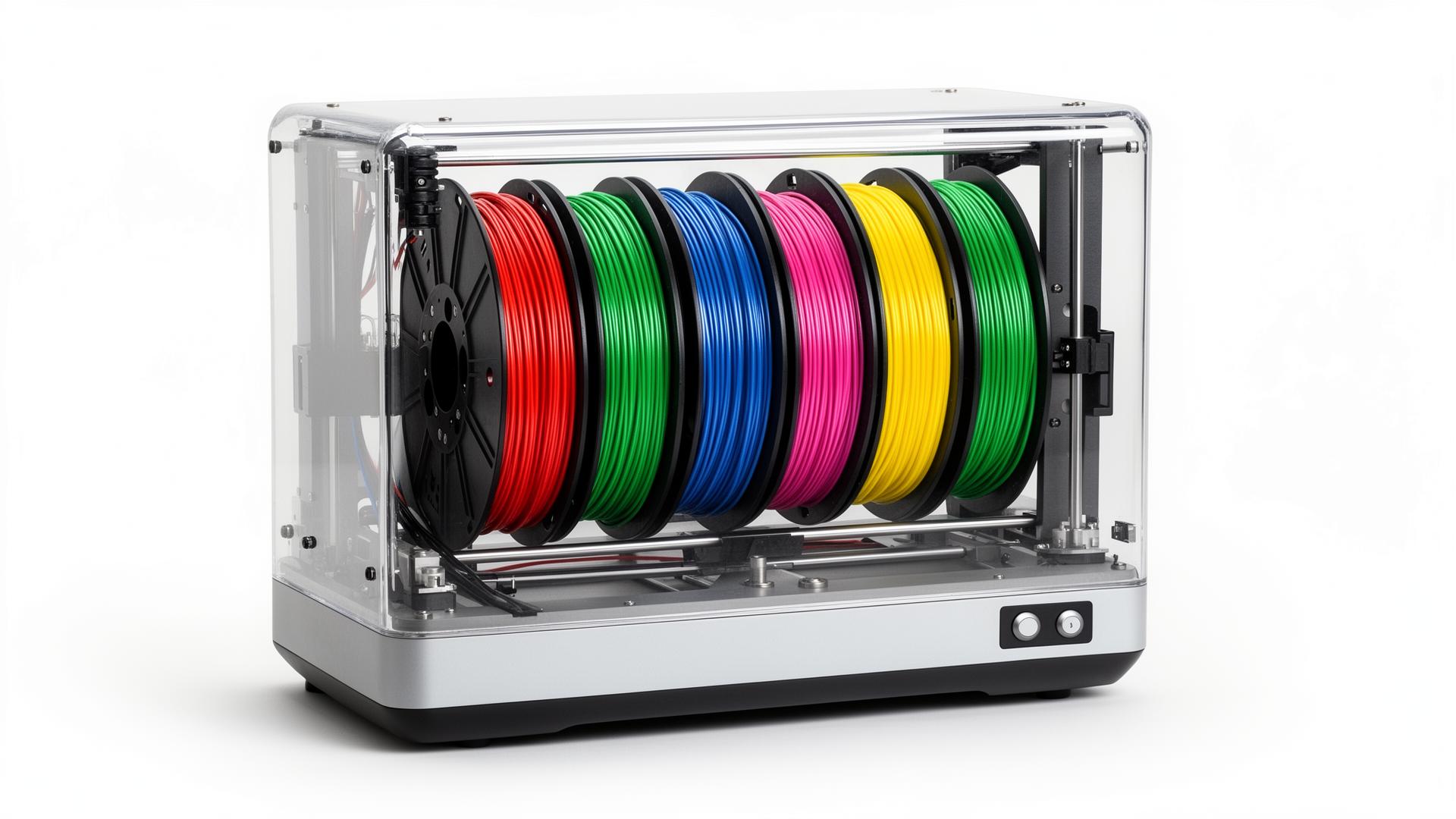
Quick Answer
Choose by material temperature first, then spool capacity, print-through support, humidity or storage features, and budget. A dryer that cannot reach your filament maker’s recommended temperature is the wrong choice even if it has more controls.
- Compact single-spool: SUNLU FilaDryer S2
- Two-spool workflows: Creality Space Pi Plus or EIBOS Cyclopes
- Modular drying and storage: Polymaker PolyDryer
- Lower-temperature dual-spool use: Sovol SH01
TL;DR — Quick Summary
Match the dryer's documented capability to the filament—not the other way around.
- 1Most important: Confirm the filament manufacturer's drying temperature before choosing a unit
- 2One spool: A compact dryer is usually enough for a single-printer workflow
- 3Two spools: Dual capacity helps only when both spools are genuinely part of your workflow
- 4During printing: A supported feed-through helps moisture-sensitive filament stay dry
- 5After drying: Use sealed dry storage to slow moisture from returning
Filament Dryer Comparison
These specifications come from current manufacturer product pages and manuals. Temperature figures describe documented device capability, not a universal setting for every filament.
| Product | Best suited for | Capacity | Documented heat | Print-through | Humidity information | Consideration |
|---|---|---|---|---|---|---|
| Polymaker PolyDryer | Modular drying and sealed storage | Up to 1 kg; XL box up to 3 kg | 3 power levels; highest reported range 68–73°C | Yes | Color-changing desiccant | Uses power levels rather than a user-set temperature |
| SUNLU FilaDryer S2 | A compact single-spool setup | 1 spool | Up to 70°C | Yes | Digital humidity display | One spool at a time |
| Creality Space Pi Filament Dryer Plus | Two-spool printing with guided controls | 2 spools | 45–70°C | Yes, two outlets | Temperature and humidity display | Takes more desk space than a single-spool dryer |
| EIBOS Cyclopes | Two spools and flexible runtime control | 2 × 1 kg spools | Up to 70°C | Yes | Real-time humidity monitor | A larger enclosure than most single-spool units |
| Sovol SH01 | Basic dual-spool drying at lower temperatures | 2 × 1 kg spools | 40–50°C | Yes | Temperature and humidity display | Its 50°C ceiling limits high-temperature drying |
Five Useful Filament Dryer Options
These are specification-based recommendations for different workflows. They are not hands-on test rankings, and affiliate relationships do not determine their order.
Polymaker PolyDryer
Manufacturer: Polymaker
Why it fits this use
- A reusable drying dock pairs with sealed PolyDryer boxes
- The standard box supports spools up to 1 kg; the XL box supports up to 3 kg
- Three preset power levels and 360-degree airflow are documented by Polymaker
- Filament can remain sealed in the box and feed directly to a printer
Know before choosing
- No numeric humidity display
- The control shows power level rather than a precise target temperature
SUNLU FilaDryer S2
Manufacturer: SUNLU
Why it fits this use
- SUNLU documents a maximum temperature of 70°C
- Upper and lower heating plates work with a bottom circulation fan
- The display shows temperature, time, humidity, filament type and countdown
- Its compact format suits a printer that normally runs one material at a time
Know before choosing
- Not intended for a two-spool workflow
- No verified affiliate destination is available on this site
Creality Space Pi Filament Dryer Plus
Manufacturer: Creality
Why it fits this use
- Dual PTC heaters circulate warm air around two spools
- The documented temperature range reaches 70°C
- A touchscreen and material presets simplify setup
- Two filament outlets support dual-material or two-printer workflows
Know before choosing
- Larger footprint
- Confirm the exact Plus or V2 Plus model before ordering
EIBOS Cyclopes
Manufacturer: EIBOS
Why it fits this use
- A 100W PTC heater and built-in fan provide active air circulation
- The enclosure accommodates two 1 kg spools or four 0.5 kg spools
- Runtime can be set up to 24 hours or run continuously
- Multiple outlet positions support printing while drying
Know before choosing
- Large footprint
- No verified affiliate destination is available on this site
Sovol SH01
Manufacturer: Sovol
Why it fits this use
- The chamber holds two standard 1 kg spools
- Temperature can be set from 40°C to 50°C
- The timer runs from 6 to 12 hours
- Sealable filament outlets allow printing from the enclosure
Know before choosing
- Not the right choice when a filament maker calls for temperatures above 50°C
- Less temperature headroom than the other active dryers compared here
Match Dryer Capability to the Material
Drying guidance varies by formulation, so check the spool, technical data sheet, or filament manufacturer before setting temperature and time. The goal is enough controlled heat and airflow to remove moisture without softening filament or deforming the spool.
PLA
Often the least demanding. Sealed storage may be enough in a dry room, but aged or humid-exposed PLA can still benefit from controlled drying.
PETG
Benefits from active airflow and a range that includes the maker's recommendation. Print-through is useful on long jobs.
TPU
Absorbs moisture readily. Confirm the required temperature and use a smooth feed-through path that does not add drag.
ABS and ASA
Choose a unit that can hold the manufacturer's specified temperature steadily; do not assume PLA settings are sufficient.
Nylon and PA
Usually require greater temperature capability and longer cycles. Verify both the filament guidance and the spool's heat tolerance.
PC, PVA and engineering materials
Treat these as formulation-specific. Higher maximum capability gives options, but the manufacturer's guidance remains the limit.
Complete Filament Types and Uses Guide
Compare common filament families and the properties that affect printing and moisture control.
What Matters in a Budget Filament Dryer
Value comes from buying the capability you will use, not the longest feature list. Start with the materials you print today and any realistic next material.
Useful temperature range
It must include your filament maker's recommended setting.
Air circulation
A fan or documented airflow helps distribute heat around the spool.
Practical runtime
The timer should cover the cycles your materials require.
Spool fit
Check diameter, width and weight—not only the number of spools.
Clear controls
Temperature, time and humidity information should be readable and useful.
Print-through support
Prioritize it when filament must stay dry throughout a long print.
Single-Spool vs Dual-Spool Dryers
Choose single-spool when…
- You normally print one material at a time
- Desk space matters
- You want the simplest filament path
- You do not need to condition a second spool simultaneously
Choose dual-spool when…
- You run two printers or two-material jobs
- You regularly prepare two spools together
- The larger enclosure fits your workspace
- The unit documents suitable airflow around both spools
Dual capacity is not automatically better. An unused second position adds size without improving a one-spool workflow.
Filament Dryer vs Dry Box: They Solve Different Problems
Active drying uses controlled heat and airflow to remove moisture already absorbed by filament. Dry storage uses a sealed container and desiccant to slow moisture from returning after the spool is dry. Passive storage generally cannot restore a wet spool by itself.
A combined system can be convenient, but you still need to distinguish its heating capability from its storage seal.
Best Filament Storage Container 2025
Once a spool is dry, compare sealed containers and dry boxes designed to keep moisture from returning.
Best TPU Filament for 3D Printing
Compare flexible-filament options and learn how hardness, feeding and moisture affect the result.
Best PETG Filament for 3D Printing
Compare PETG options and the printing considerations that matter for reliable parts.
Frequently Asked Questions
What is the best filament dryer for 3D printing?
The best filament dryer is the one that reaches the temperature recommended by your filament manufacturer, fits your spool, and supports your workflow. A compact single-spool dryer suits many printers, while a dual-spool model helps with multi-material work. PolyDryer stands out when sealed storage is as important as drying.
Do I need a filament dryer?
A dryer is useful when filament pops, strings excessively, extrudes with a rough surface, or produces unexpectedly weak layers. It is especially useful for moisture-sensitive materials and in humid rooms. If you print only fresh PLA in a dry environment, sealed storage may be enough until symptoms appear.
What should I look for in a filament dryer?
Match the documented temperature range to your materials, then check spool dimensions, airflow, timer behavior, print-through outlets, capacity, and humidity information. A higher maximum temperature is not automatically better if your materials do not require it.
Is a filament dryer worth it for PLA?
PLA usually needs less aggressive moisture control than nylon or TPU, but it can still absorb enough moisture to affect printing after long exposure or in humid conditions. For occasional PLA use, good sealed storage may be the better first purchase; use a dryer when symptoms or the manufacturer guidance justify it.
What type of dryer is useful for PETG?
Choose a dryer whose adjustable range includes the PETG manufacturer's recommended drying temperature and that circulates air around the spool. A print-through outlet is helpful because PETG can begin reabsorbing moisture during long prints.
What should I look for when drying TPU?
Confirm the TPU maker's temperature guidance, use controlled airflow, and consider printing directly from the dryer. Flexible filament can reabsorb moisture quickly, so the filament path should also feed smoothly without adding excessive drag.
Why does nylon need careful moisture control?
Nylon is strongly hygroscopic and can absorb moisture rapidly. Look for a dryer that reaches the exact temperature specified by the nylon manufacturer and can run for the required duration. Printing from the dryer or a dry box helps limit moisture return during the print.
Is a single-spool or dual-spool dryer better?
Single-spool dryers are usually smaller and make sense for one-printer workflows. Dual-spool dryers are useful for two-color, support-material, or two-printer setups, but they take more space and both spools should receive suitable airflow. Buy dual capacity only when you will use it.
Can you print directly from a filament dryer?
Yes, when the dryer has a suitable filament outlet and the manufacturer supports print-through use. This can be valuable for long prints with PETG, TPU, nylon, PVA, and other moisture-sensitive materials.
What is the difference between a filament dryer and a dry box?
A filament dryer uses controlled heat and airflow to remove absorbed moisture. A dry box or sealed storage container mainly slows moisture from returning after the spool is dry. Some products combine active drying with sealed storage, but passive storage does not replace heat when a spool is already wet.
Final Decision
Start with the highest drying temperature your actual materials require. Then decide whether one spool, two spools, or modular sealed storage fits how you print. For many users, that process narrows the list faster—and more honestly—than choosing a single universal winner.
Recheck the manufacturer page and manual for the exact model before ordering, especially where similarly named revisions exist.
Affiliate Disclosure: 3D Print Geek participates in affiliate programs with Polymaker and Sovol3D. We may earn a commission on qualifying purchases at no extra cost to you. Recommendations on this page are based on documented product specifications and use-case fit, not commission level. Full disclosure.
Related Articles
Best Filament for Functional Parts (What Actually Holds Up)
The best filament for functional 3D parts — real picks for strength, heat, and impact. US-focused guidance and research-based recommendations.
Best Filament for Large 3D Prints (No More Warping & Failed Prints)
The best filament for large 3D prints — what reduces warping and failed prints. Real US picks, USD pricing, research-based recommendations.
Best ABS Filament (Top Picks for Strength & Durability in 2026)
The best ABS filament for 2026 — real picks, US pricing, and what actually works for strong, heat-resistant 3D prints.