Best 3D Scanners for 3D Printing (2026): Budget to Pro Picks
By Chris Avery, Publisher / Editor
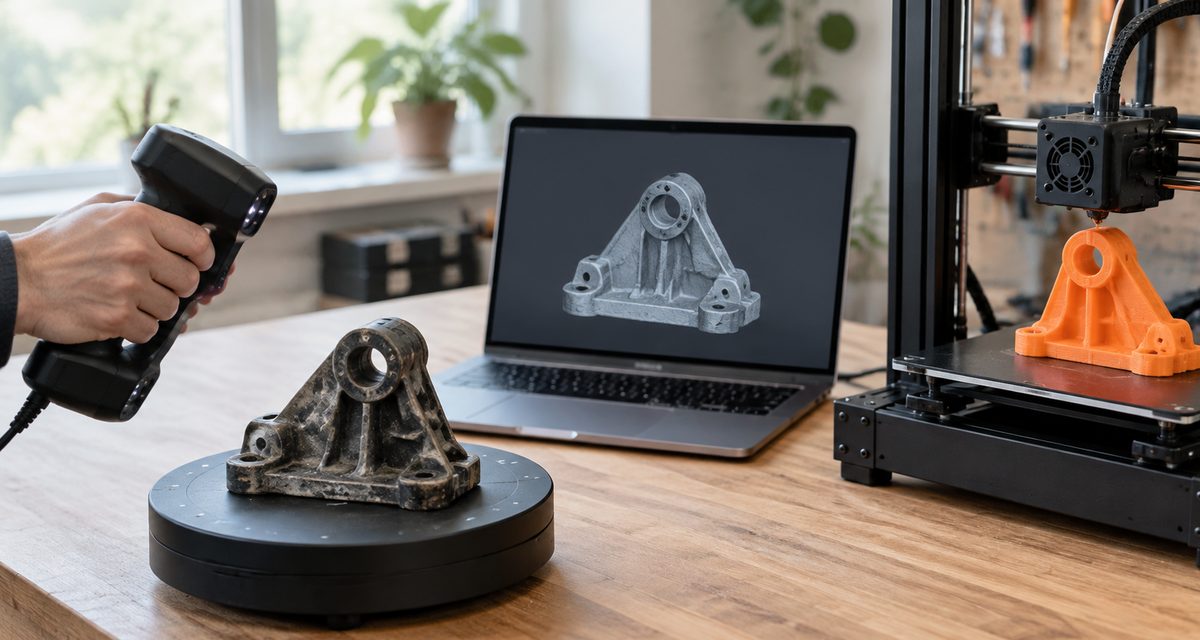
A 3D scanner turns a real object into a 3D model you can print: a replacement for a broken part, a copy of a sculpture, a helmet that fits your head. Consumer scanners have improved quickly, but they still differ a lot in what size of object they handle, how much detail they capture and what computer they need. This guide picks the best scanner for each common job, explains what the accuracy numbers mean, and walks through turning a scan into a printable STL.
Quick Answer
The best 3D scanner for 3D printing for most people is the Creality CR-Scan Raptor: it pairs a blue laser mode for detail with an infrared mode for speed, and Creality rates it at up to 0.02 mm accuracy for objects from 5 mm to 2 m. On a budget, the Creality CR-Scan Ferret Pro handles medium and large objects at 0.1 mm. For small parts and figurines choose the Revopoint MINI 2; for car parts and full-size props, the SHINING 3D EINSTAR 2.
Amazon buttons open Amazon.com search results for that exact product name in a new tab, not a single product page. Results can include other editions, bundles and similar scanners, so match the brand and model before you buy. Amazon affiliate links. As an Amazon Associate I earn from qualifying purchases.
TL;DR — Quick Summary
Best 3D Scanners for 3D Printing — 2026 Picks
- 1🏆 Best overall: Creality CR-Scan Raptor — blue laser + infrared, up to 0.02 mm, 5 mm to 2 m
- 2💲 Best budget: Creality CR-Scan Ferret Pro — 0.1 mm, wireless, works with phones
- 3✋ Best handheld: Revopoint POP 4 — three scan modes, 286 g, battery grip
- 4🔍 Best for small objects: Revopoint MINI 2 — blue light, 0.02 mm precision, 10 mm minimum
- 5🚗 Best for larger objects: SHINING 3D EINSTAR 2 — IR mode out to 1,400 mm
- 6🌱 Best for beginners: Revopoint INSPIRE 2 — marker-free, phone scanning, AI background removal
What is 3D scanner?
3D scanner A device that measures the shape of a real object, usually by projecting light or laser lines onto it and recording them with cameras, and turns the measurements into a point cloud and then a 3D mesh that can be exported for 3D printing.
🛠️ What will you scan and print?
Replacement parts, cosplay, figures and home fixes: see what people actually make with a 3D printer.
3D Scanners Compared
Specifications below come from each maker's product and specification pages, checked on November 19, 2026. Accuracy figures are the makers' own laboratory ratings and are not directly comparable between brands, because each maker measures them slightly differently. We do not publish prices; the buttons open current Amazon listings.
Best overall 3D scanner for 3D printing
Creality CR-Scan Raptor
Technology: 7 blue laser lines + NIR structured light
Maker's accuracy or resolution: Up to 0.02 mm
Smallest object: 5 mm (product page); 10 mm on Creality's comparison page
Working distance: About 170 to 1,000 mm (Creality)
Exports: STL, OBJ, PLY, ASC
Read why we picked it →Best budget 3D scanner
Creality CR-Scan Ferret Pro
Technology: Structured light (dual camera)
Maker's accuracy or resolution: 0.1 mm
Smallest object: 50 x 50 x 50 mm
Working distance: 150 to 700 mm
Exports: STL, OBJ, PLY
Read why we picked it →Best handheld 3D scanner
Revopoint POP 4
Technology: 30 blue cross laser lines + NIR full-field + VCSEL
Maker's accuracy or resolution: Up to 0.03 mm (laser mode)
Smallest object: 10 x 10 x 10 mm
Working distance: 170 to 800 mm, by mode
Exports: STL, 3MF, OBJ, PLY and more
Read why we picked it →Best for small objects and miniatures
Revopoint MINI 2
Technology: Dual-camera blue structured light
Maker's accuracy or resolution: 0.05 mm (0.02 mm precision)
Smallest object: 10 x 10 x 10 mm
Working distance: 120 to 250 mm
Exports: STL, 3MF, OBJ, PLY and more
Read why we picked it →Best for larger objects
SHINING 3D EINSTAR 2
Technology: 17 blue parallel laser lines + infrared VCSEL
Maker's accuracy or resolution: 0.05 mm resolution (laser)
Smallest object: 10 mm (laser), 50 mm (IR)
Working distance: 100 to 1,400 mm, by mode
Exports: STL, 3MF, OBJ, PLY, ASC
Read why we picked it →Best 3D scanner for beginners
Revopoint INSPIRE 2
Technology: 11 infrared laser lines + infrared structured light
Maker's accuracy or resolution: Up to 0.05 mm
Smallest object: 20 x 20 x 20 mm
Working distance: 200 to 400 mm (indoor)
Exports: STL, 3MF, OBJ, PLY and more
Read why we picked it →The Best 3D Scanners for 3D Printing
Each pick covers one common job. We have not tested these scanners ourselves and do not publish our own accuracy measurements. The specifications come from each maker, and we point out where a scanner's limits matter for 3D printing.
Blue laser and infrared handheld scanner
Creality CR-Scan Raptor
Best for: Replacement parts, props and sculptures, from small details up to objects about 2 m long. Technology: 7 blue laser lines + NIR structured light.
Most people who buy a scanner for 3D printing want to copy or repair real objects: a broken bracket, a knob, a helmet base, a figure. The Raptor covers that range with two light sources in one body. Its blue laser mode is the one to use for detailed or tricky surfaces, and its infrared mode is for faster, marker-free scans of larger, feature-rich objects and people. Creality rates it at up to 0.02 mm accuracy and 60 fps, for objects from 5 mm to 2,000 mm, and its software runs on an ordinary Windows or Mac computer rather than requiring a high-end graphics card at the minimum. That combination of detail, range and modest computer needs is why it is our overall pick.
Maker's specifications
- Blue laser mode (7 parallel lines) and infrared structured light mode
- Accuracy up to 0.02 mm; up to 60 fps; objects 5 to 2,000 mm
- 24-bit color capture; 372 g, 215 x 50 x 74 mm
- Creality Scan on Windows 10/11 (64-bit) and macOS; exports STL, OBJ, PLY and ASC
Watch out for
- Creality's guide says blue laser mode needs reflective circular markers on or around the object
- For objects about 250 mm or larger on each side, Creality recommends scanning global markers first
Amazon buttons open Amazon.com search results for that exact product name in a new tab, not a single product page. Results can include other editions, bundles and similar scanners, so match the brand and model before you buy. Amazon affiliate links. As an Amazon Associate I earn from qualifying purchases.
Details from the Creality CR-Scan Raptor product page, Creality comparison page and Creality Scan software manual.
Entry-level wireless structured light scanner
Creality CR-Scan Ferret Pro
Best for: Busts, cosplay pieces, larger props and rough reference scans. Technology: Structured light (dual camera).
If you mainly want to scan medium-sized things and print them, you do not need laser-level accuracy. The Ferret Pro is the top model in Creality's entry-level Ferret series. Creality lists 0.1 mm accuracy, a large 560 x 820 mm capture area at 700 mm and up to 30 fps, which suits heads, helmets, shoes and props. It also works with more devices than most scanners here: Windows and Mac over cable or Wi-Fi 6, Android, and iPhone 11 or newer, and it comes with a battery grip. The trade-off is the 50 mm minimum object size, so it is the wrong tool for small parts and miniatures.
Maker's specifications
- Accuracy 0.1 mm; point distance 0.16 mm; up to 30 fps
- Working distance 150 to 700 mm; single capture 560 x 820 mm at 700 mm
- Windows and Mac (wired or Wi-Fi 6), Android, iPhone 11 or later; 5000 mAh battery grip
- Outdoor scanning below 30,000 lux; exports OBJ, STL and PLY
Watch out for
- Minimum object size is 50 x 50 x 50 mm, so small parts and miniatures are out
- 0.1 mm accuracy is fine for props and figures; parts that must fit tightly still need measuring and CAD work
Amazon buttons open Amazon.com search results for that exact product name in a new tab, not a single product page. Results can include other editions, bundles and similar scanners, so match the brand and model before you buy. Amazon affiliate links. As an Amazon Associate I earn from qualifying purchases.
Details from the Creality CR-Scan Ferret Pro product page and Creality scanner comparison page.
Wireless blue laser and infrared scanner
Revopoint POP 4
Best for: One scanner you can carry around for small to medium objects, with or without a turntable. Technology: 30 blue cross laser lines + NIR full-field + VCSEL.
The POP 4 is the most flexible handheld here. At 286 g it packs three scanning technologies: blue laser lines for detail on dark or shiny parts, near-infrared full-field structured light for marker-free scans of objects and people, and a VCSEL mode for faster, larger scans, including outdoors. Revopoint rates the laser mode at up to 0.03 mm single-frame accuracy, with a 10 mm minimum and 2 m maximum scan volume. It runs wirelessly over Wi-Fi 6 from a 5500 mAh battery grip that Revopoint rates at about four hours, and it also works on a desk with Revopoint's turntable. Real-time AI segmentation removes the table and your fingers from the scan, which saves cleanup time.
Maker's specifications
- Laser single-frame accuracy up to 0.03 mm; volumetric 0.03 mm + 0.05 mm x length (m)
- Working distance 170 to 370 mm (laser), 200 to 500 mm (full-field), 300 to 800 mm (VCSEL)
- Laser up to 105 fps with an NVIDIA GPU (60 fps on CPU); 286 g; Wi-Fi 6; 5500 mAh battery grip
- Exports PLY, OBJ, STL, ASC, 3MF, GLTF, FBX and Splat
Watch out for
- Laser scanning needs a capable computer: Revopoint's Windows minimum is 16 GB RAM and an RTX 3060-class GPU
- Revopoint's spec table lists iOS as coming soon while the product page lists iOS, so check your phone before relying on it
Amazon buttons open Amazon.com search results for that exact product name in a new tab, not a single product page. Results can include other editions, bundles and similar scanners, so match the brand and model before you buy. Amazon affiliate links. As an Amazon Associate I earn from qualifying purchases.
Details from the Revopoint POP 4 product and specification page.
Blue light scanner for small objects
Revopoint MINI 2
Best for: Small mechanical parts, jewelry-sized objects, figurines and coins. Technology: Dual-camera blue structured light.
Small objects need a scanner that works close up with a small capture area, and that is what the MINI 2 is built for. Revopoint lists single-frame precision up to 0.02 mm, single-frame accuracy up to 0.05 mm and a point distance of up to 0.02 mm, with a 120 to 250 mm working distance and a capture area as small as 52 x 64 mm. It uses Class 1 blue structured light and weighs 175 g. For miniatures and small parts, pair it with a turntable so the object rotates while the scanner stays still. Do not expect it to replace a careful sculpt: tiny details on a 28 mm figure push any desktop scanner hard.
Maker's specifications
- Single-frame precision up to 0.02 mm; single-frame accuracy up to 0.05 mm
- Working distance 120 to 250 mm; capture area 52 x 64 mm at 120 mm to 168 x 132 mm at 250 mm
- Minimum scan volume 10 x 10 x 10 mm; up to 16 fps; 175 g
- Windows, macOS, Android and iOS; exports PLY, OBJ, STL, ASC, 3MF, GLTF and FBX
Watch out for
- No outdoor scanning, and Revopoint says to use scanning spray on transparent, dark or highly reflective objects
- The small capture area makes anything bigger than a shoe slow to scan; pick another scanner for large objects
Amazon buttons open Amazon.com search results for that exact product name in a new tab, not a single product page. Results can include other editions, bundles and similar scanners, so match the brand and model before you buy. Amazon affiliate links. As an Amazon Associate I earn from qualifying purchases.
Details from the Revopoint MINI 2 product and specification page.
Wireless blue laser and infrared scanner
SHINING 3D EINSTAR 2
Best for: Car parts, furniture, full-size cosplay armor, people and large props. Technology: 17 blue parallel laser lines + infrared VCSEL.
Large objects need a big capture area and stable tracking, and the EINSTAR 2's infrared mode is built for that. SHINING 3D lists a working distance of 160 to 1,400 mm and a maximum field of view of 1,170 x 1,385 mm in IR Rapid mode, with marker-free feature, texture or hybrid alignment. When you need detail on part of the object, its Laser HD mode uses 17 blue parallel laser lines with a 0.05 mm resolution. It is wireless through a built-in Wi-Fi module and runs on swappable batteries. It is the heaviest and most demanding scanner here, but it is the one we would choose for a bumper, a chair or a full suit of armor.
Maker's specifications
- Laser HD: 17 blue parallel lines, resolution 0.05 to 10 mm, working distance 100 to 600 mm
- IR Rapid: VCSEL, working distance 160 to 1,400 mm, max field of view 1,170 x 1,385 mm
- Built-in Wi-Fi; two swappable batteries, up to 3 hours of runtime (SHINING 3D); 420 g
- Outdoor scanning below 110,000 lux (laser) and 70,000 lux (IR); exports STL, OBJ, PLY, 3MF, ASC
Watch out for
- SHINING 3D's PC requirements are the highest here: 32 GB RAM minimum and a dedicated NVIDIA RTX graphics card
- Laser HD mode aligns with markers only, and it is a Class 2 laser, so avoid looking into the beam
Amazon buttons open Amazon.com search results for that exact product name in a new tab, not a single product page. Results can include other editions, bundles and similar scanners, so match the brand and model before you buy. Amazon affiliate links. As an Amazon Associate I earn from qualifying purchases.
Details from the EINSTAR 2 specification page, computer requirements and FAQ.
Infrared laser and structured light scanner
Revopoint INSPIRE 2
Best for: First-time scanning of everyday objects, figures and people. Technology: 11 infrared laser lines + infrared structured light.
A beginner's first scans should work without markers, sprays or a powerful computer, and the INSPIRE 2 makes that easy. Its infrared structured light mode tracks objects by their shape, needs no markers, and can run directly from an iPhone or Android phone over Wi-Fi. One-click AI segmentation removes the background as you scan, so the model needs less cleaning. When you are ready for more, its 11 infrared laser lines capture dark or shiny surfaces without spray. Revopoint lists accuracy up to 0.05 mm and precision up to 0.03 mm, and Revo Scan exports print-ready STL and 3MF files.
Maker's specifications
- Single-frame accuracy up to 0.05 mm; precision up to 0.03 mm; volumetric 0.05 mm + 0.1 mm x length (m)
- Indoor working distance 200 to 400 mm; capture 130 x 129 mm to 293 x 257 mm
- Structured light up to 18 fps; laser up to 90 fps with a GPU (40 fps on CPU); scan volume 20 mm to 2 m
- Windows, macOS, Android and iOS; exports PLY, OBJ, STL, ASC, 3MF, GLTF, FBX and Splat
Watch out for
- Laser mode needs markers and a PC; only the structured light mode works standalone on a phone
- Outdoor scanning is limited to 20,000 lux, so scan in shade rather than direct sun
Amazon buttons open Amazon.com search results for that exact product name in a new tab, not a single product page. Results can include other editions, bundles and similar scanners, so match the brand and model before you buy. Amazon affiliate links. As an Amazon Associate I earn from qualifying purchases.
Details from the Revopoint INSPIRE 2 product and specification pages.
3D Scanner Accuracy and Resolution Explained
Scanner spec sheets use several numbers that sound alike but measure different things. Knowing which is which stops you paying for detail you will never print, or buying a scanner that cannot capture the part you need.
Accuracy
How close a measurement is to the true size. "Single-frame" accuracy is from one capture; makers measure it in a lab, so treat it as a best case.
Volumetric accuracy
How error grows across a whole object, written like "0.03 mm + 0.05 mm x L", where L is the length in meters. It matters most for large objects.
Resolution (point distance)
How close together the measured points are. Smaller spacing captures finer detail, but it does not make each point more accurate.
Volumetric accuracy shows why a big object is harder. Using Revopoint's own figures, the POP 4's laser mode is rated at 0.03 mm + 0.05 mm per meter of object length, so for a 500 mm part the rated error grows to about 0.055 mm. Wide-area infrared modes, such as the EINSTAR 2's IR Rapid mode, trade some detail for speed and a bigger capture area: SHINING 3D lists 0.2 mm resolution in that mode against 0.05 mm in Laser HD.
How much accuracy do you need? Think about your printer first. A typical FDM printer uses a 0.4 mm nozzle and prints layers of 0.1 to 0.3 mm, so for figures, busts and cosplay a scanner rated around 0.1 mm is usually enough. Small parts, miniatures and anything that must fit another part benefit from 0.05 mm or better, and from a resin printer that can reproduce that detail. For a part with a critical dimension, such as a bearing seat or screw hole, measure the original with calipers and use the scan as a guide in CAD rather than printing the raw mesh.
Minimum object size matters as much as accuracy. A scanner with a 50 mm minimum, such as the Ferret Pro, simply cannot capture a 20 mm knob, however good its other numbers are.
Software Compatibility and Export Formats
Every scanner here comes with its maker's own free scanning software: Creality Scan for the Raptor and Ferret Pro, Revo Scan for the Revopoint models, and EXStar Hub for the EINSTAR 2. That software handles capture, fusing the point cloud, building the mesh and exporting it. Before you buy, check two things: that it runs on your computer or phone, and that your computer meets the maker's requirements for the scan mode you want.
| Scanner | Works with (maker) | Computer note (maker) |
|---|---|---|
| CR-Scan Raptor | Windows 10/11 (64-bit), macOS | Minimum Intel i5 8th gen and 8 GB RAM; recommended i7 with NVIDIA graphics and 16 GB |
| CR-Scan Ferret Pro | Windows, macOS, Android, iPhone 11 or later | Wireless to computers and phones through Wi-Fi 6 |
| POP 4 | Windows 10/11, macOS, Android; iOS listed as coming soon in the spec table | Laser mode: 16 GB RAM and an RTX 3060-class GPU minimum on Windows |
| MINI 2 | Windows 10/11, macOS, Android, iOS | Wi-Fi 6 and USB-C |
| EINSTAR 2 | Windows 10/11 (64-bit); EXStar Hub also lists recent macOS | 32 GB RAM minimum and a dedicated NVIDIA RTX graphics card |
| INSPIRE 2 | Windows 10/11, macOS, Android, iOS | Structured light runs on a phone; laser mode needs a PC with a GPU |
Which file format to export
- STL: The universal 3D printing format. Every slicer opens it. It stores shape only, with no color or units, so check the scale when you import it.
- 3MF: A newer printing format that keeps units and can hold color and print settings in one file. The Revopoint and EINSTAR scanners export it directly.
- OBJ: Stores shape plus color texture in separate files. Useful for full-color printing, rendering or editing in Blender.
- PLY: Often used for raw point clouds and colored meshes. Good for editing and archiving, but convert to STL or 3MF for printing.
A scan gives you a mesh, a surface made of triangles, not an editable CAD model. That is ideal for organic shapes such as faces, figures and sculptures. For mechanical parts you want to modify, scan-to-CAD software fits surfaces and features to the mesh; Creality sells QUICKSURFACE alongside its scanners, and Revopoint sells an INSPIRE 2 Premium bundle with a one-year Revo Design license.
From Scan to STL: Preparing a Model to Print
The steps are similar whichever scanner you use. Expect your first few scans to take longer in cleanup than in scanning.
- 1Prepare the object: Clean it, and decide whether it needs scanning spray (transparent or mirror-like surfaces) or markers (laser modes, large objects, or plain shapes with few features). Put small objects on a turntable.
- 2Scan in overlapping passes: Keep the scanner inside its working distance, move slowly, and overlap each pass so tracking does not drop. Scan the top and bottom separately and align them afterwards if you need to.
- 3Fuse and mesh: Let the software fuse the point cloud and build a mesh. Remove stray points, the table and markers, fill small holes and, for printing, make the mesh watertight.
- 4Simplify the mesh: Raw scans can contain millions of triangles. Reduce the count until the detail you care about is still there; your slicer and computer will thank you.
- 5Check the scale: Measure one or two features on the original with calipers and compare them with the mesh. Correct the scale before you export.
- 6Add a flat base and export: Cut a flat bottom so the print sits on the bed, then export as STL or 3MF. Open it in your slicer, repair any errors it reports, and run a small test print first.
Large scans may not fit on your printer's bed. Split them into parts in your slicer or in Blender, print them separately and join them afterwards. For functional parts, choose a filament suited to the job rather than reprinting the scan in whatever is loaded.
Buying Guide: How to Choose a 3D Scanner
Work through these in order. The first two decide most of the choice.
- 1Start with object size: Write down the smallest and largest things you plan to scan. Small parts and figures need a close-range scanner with a small minimum size, such as the MINI 2. Car parts, furniture and people need a large capture area, such as the EINSTAR 2's infrared mode.
- 2Match accuracy to the print: For FDM props and figures, about 0.1 mm is usually enough. Miniatures, small mechanical parts and resin prints benefit from 0.05 mm or better. Paying for 0.02 mm only helps if your printer and workflow can use it.
- 3Check your computer: Laser modes and high frame rates often need a recent GPU and 16 to 32 GB of RAM. Read the maker's requirements for the exact mode you want, not just the headline spec.
- 4Think about surfaces: Dark, shiny or metal objects are easier with blue or infrared laser modes. Transparent objects still need spray. Plain shapes with few features need markers.
- 5Decide on wireless and phones: Wireless scanning and phone support make it easier to walk around large objects or scan away from a desk. Check which modes work on a phone; laser modes usually need a computer.
- 6Plan the software side: Every scanner here exports STL. If you want to modify mechanical parts, budget time or money for CAD or scan-to-CAD software as well.
Accessories worth considering
- Turntable: Makes small objects far easier to scan, because the object turns while the scanner stays still. Several makers sell one for their scanners.
- Markers: Reflective dots help tracking on plain or large objects, and laser modes often require them. Scanner makers sell marker sets for their scanners.
- Scanning spray: A temporary matte coating for transparent or mirror-like surfaces. Use one made for scanning that fades or wipes off, and test it on a hidden area first.
Frequently Asked Questions
What is the best 3D scanner for 3D printing?
For most people, the Creality CR-Scan Raptor. It combines a blue laser mode for detail with an infrared mode for faster scans, Creality rates it at up to 0.02 mm accuracy for objects from 5 mm to 2,000 mm, and its software runs on an ordinary Windows or Mac computer. On a budget, the Creality CR-Scan Ferret Pro is the better choice for medium and large objects.
Can you 3D scan an object and then 3D print it?
Yes. The scanner captures the surface as a point cloud, its software turns that into a mesh, and you export the mesh as an STL or 3MF file for your slicer. Expect to clean up the mesh, fill holes, check the scale and flatten a base before printing. For parts that must fit precisely, use the scan as a reference and model the part in CAD.
What accuracy do I need in a 3D scanner for 3D printing?
It depends on what you print. For props, busts and figures printed on an FDM printer, 0.1 mm accuracy is usually enough. For small parts, miniatures or anything that must fit another part, look for 0.05 mm or better and check the scanner's minimum object size. Accuracy figures are makers' lab ratings, so measure critical dimensions with calipers.
Can I use my phone as a 3D scanner?
For some jobs. Phone photogrammetry and depth-sensor apps can capture larger, well-textured objects, but they are generally less detailed and less reliable on small, shiny or featureless parts than a dedicated scanner. Several scanners in this guide, including the Ferret Pro and INSPIRE 2, can use a phone as their screen and computer.
Do 3D scanners need scanning spray?
Sometimes. Transparent and mirror-like surfaces usually need a temporary matte scanning spray. Several current scanners say they can capture black or metal objects without spray, especially in laser modes, but makers such as Revopoint still recommend spray for transparent or highly reflective surfaces.
What file format do I need to 3D print a scan?
STL or 3MF. Every slicer opens STL, and 3MF is a newer format that keeps units and settings in one file. OBJ and PLY can store color, which is useful for full-color printing or rendering, but most single-color prints only need STL. All six scanners in this guide export STL.
Can a 3D scanner capture miniatures?
Within limits. A small-object scanner such as the Revopoint MINI 2, used with a turntable, can capture figurines and small parts, but the finest details on a 28 mm miniature push any desktop scanner hard. Scanners with a 50 mm minimum object size, such as the Ferret Pro, are not suitable for miniatures.
Is it legal to scan and 3D print an object?
Scanning an object does not change who owns its design. Scanning your own original work or a broken part for personal repair is common, but copying, sharing or selling prints of someone else's design can infringe copyright, design rights or trademarks. Check the rights before you share or sell anything you scanned.
The Bottom Line
If you want one scanner for printing replacement parts, props and figures, get the Creality CR-Scan Raptor. Its laser and infrared modes cover small details and larger objects, and it does not demand a high-end computer. If your budget is tight and your objects are bigger than about 5 cm, the CR-Scan Ferret Pro does the job at 0.1 mm and works with phones.
Choose by the job for the rest. The Revopoint POP 4 is the most flexible wireless handheld, the MINI 2 is the one for small parts and figurines, the EINSTAR 2 handles car parts and full-size props if your computer can keep up, and the INSPIRE 2 is the easiest start for marker-free scanning from a phone.
Start Here
One all-round scanner, or a budget option for bigger objects.
Amazon buttons open Amazon.com search results for that exact product name in a new tab, not a single product page. Results can include other editions, bundles and similar scanners, so match the brand and model before you buy. Amazon affiliate links. As an Amazon Associate I earn from qualifying purchases.
How We Chose
We looked for scanners that suit common 3D printing jobs, are sold on Amazon.com, and have a maker that publishes accuracy, working distance, minimum object size, supported devices and export formats. We read each maker's specification pages, software guides and computer requirements, and on November 19, 2026 we checked that an Amazon.com search for each scanner's exact name returned that scanner as the first result.
We have not tested these scanners and do not publish measurements, prices or star ratings. New scanners launch often, including several announced in late 2026, so we only include models that were on sale when we checked.
Affiliate Disclosure: This post contains affiliate links. If you purchase through these links, we may earn a small commission at no extra cost to you. We only recommend products we stand behind. See our full disclosure for details.
As an Amazon Associate I earn from qualifying purchases.