Cheap vs Expensive 3D Printers — What Actually Happens
By Chris Avery, Publisher / Editor
Saving $150 on a cheap 3D printer can seem smart, but it often ends up costing more in wasted filament, frustration, and time. Here's what really happens at each price point.
Quick Answer
Cheap 3D printers (under $200) will work, but you'll spend more time fixing problems than printing. Mid-range printers ($250–$400) like the Sovol SV06 give you 90% of premium quality at a fraction of the price. That's the sweet spot for most people — reliable prints without the frustration.
TL;DR — Quick Summary
Cheap vs Expensive — What Actually Matters
- 1Best Value Pick: Sovol SV06 — mid-range features, budget price
- 2Hidden Cost: Cheap printers waste $50-$100+ in failed prints and filament
- 3Key Difference: Auto bed leveling alone saves hours of frustration
- 4Bottom Line: Spend $250-$400 and skip the pain of ultra-budget machines
What is Price-to-Performance Ratio?
Price-to-Performance Ratio The value you get from a 3D printer relative to what you pay. A printer with a good ratio delivers consistent, quality prints without requiring expensive upgrades or constant troubleshooting — not just a low sticker price.
If you're just starting out, read this before buying anything
My complete beginner's guide breaks down exactly what to look for — and what to avoid — in your first printer.
What "Cheap" vs "Expensive" Actually Means in 3D Printing
Before we get into what actually happens, let's be clear about what we're talking about. These price tiers are pretty well-defined at this point:
Price Tier Breakdown
Here's what most comparison articles won't tell you: the difference between a $150 printer and a $300 printer is massive. But the difference between a $300 printer and a $600 printer? Way smaller than you'd think.
The mid-range is generally where the real value lives.
What Actually Happens When You Buy a Cheap 3D Printer?
To be clear — cheap printers technically work. They print things. But "working" and "working well" are two very different things.
The Setup Experience
Budget printers around $150 often arrive in dozens of pieces with instructions that look like they were translated by someone who'd never seen a 3D printer. Assembly can take several hours, often requiring extra YouTube videos just to figure out the wiring — not exactly the "unbox and print" experience the listing promised.
The First Week
Leveling the bed manually is usually the worst part. It can seem dialed in, then halfway through a print the corner lifts because the bed warped slightly when it heated up. It's common to spend more time sliding a piece of paper under the nozzle than actually printing.
A first "successful" print on a cheap printer often looks like a benchy left in the sun — rough surfaces, visible layer lines, and one side noticeably thicker than the other. It technically finishes… but it isn't good.
The Constant Tweaking
Every print becomes a gamble. Some days it works okay; other days, the same file with the same settings fails three times in a row. Hours of adjusting settings can still end with a blob of spaghetti stuck to the nozzle after an overnight print.
The frustrating part is not knowing whether the problem is the slicer settings, the filament, the bed, or the frame. When everything is questionable quality, it's hard to isolate what's actually wrong.
Getting rough, messy prints? Here's what actually fixes it
Rough prints usually come down to one of three things — here's what to check.
What Changes When You Switch to a Mid-Range Printer?
Switching from a cheap printer to a mid-range option like the Sovol SV06 typically produces a dramatic difference — comparable to upgrading from a camping stove to a proper kitchen setup.
Setup Is Simpler
The SV06 comes mostly assembled. About 20 minutes of putting on a few bolts, running the auto-leveling sequence, and loading filament is usually enough to get the first print started.
Consistent Results from Day One
Auto bed leveling alone changes everything. No more paper-sliding rituals, no more guessing — hit print, walk away, come back to a finished part. The PEI build plate means prints pop off cleanly when cool, avoiding the scraping and bed gouging common with cheaper machines.
Same filament, same models, dramatically different results are typical: smooth surfaces, clean overhangs, and prints that actually match the slicer preview. It isn't magic — it's just a machine that works the way it's supposed to.
Less Troubleshooting, More Printing
Cheap printers often succeed on roughly 60% of prints, while a reliable mid-range printer like the SV06 can push that closer to 95%. That difference in success rate alone can make the price gap irrelevant — the filament saved from fewer failed prints can offset much of the upgrade cost.
Best 3D Printer for Beginners (2025)
The ultimate beginner guide — our #1 money page
3D Printer Filament Types and Uses Guide
Complete guide to every filament type with properties and uses
Best 3D Printer for Beginners (2025)
The ultimate beginner guide — our #1 money page
First layer still giving you problems? Fix it for good
Most first-layer issues come from the same handful of causes — here's how to nail it every time.
Put numbers on the hidden costs
Use the 3D Printing Cost Calculator to estimate material and electricity per print, including what failed prints add, before deciding how much printer to buy.
When Do Cheap 3D Printers Actually Make Sense?
Cheap printers aren't always a bad choice. There are legitimate reasons to go budget:
- You want to learn how printers work — cheap printers force you to understand every component because you'll be fixing them constantly. If you're an engineering student or tinkerer, that's actually valuable.
- You're not sure you'll stick with the hobby — spending $150 to test the waters before committing $300+ makes sense if you genuinely don't know if you'll enjoy it.
- You just want basic prototypes — if print quality doesn't matter and you just need rough shapes to test fits, a cheap printer can do that.
- You want a project, not a tool — some people enjoy the tinkering more than the printing. If that's you, a cheap printer is an endless project.
But if you want to print things — reliably, with decent quality, without fighting your machine — then no, a $100 printer is not the move.
When Should You Definitely NOT Go Cheap?
If any of these describe you, skip the budget tier entirely:
- You want consistent results — you expect to hit print and get a good result most of the time
- You don't enjoy troubleshooting — you want to design and print, not diagnose problems
- You're making gifts or functional parts — you need prints that actually look good and work properly
- You value your time — the hours spent fixing a cheap printer add up fast
- You're serious about the hobby — you know you'll keep printing and want a solid foundation
For literally all of these, a mid-range printer eliminates the problem. You're paying for fewer headaches, not just better specs.
What's a Better Alternative?
Among mid-range options, the Sovol SV06 stands out consistently. It offers features that used to cost $400+:
- Auto bed leveling — no more paper tests, it just handles it
- PEI spring steel build plate — prints stick during printing, pop off when cool
- All-metal hotend — print PETG, TPU, and higher-temp materials without upgrades
- Direct drive extruder — better filament control, especially for flexibles
- Open-source firmware — easy to customize if you want to later
Is it the flashiest printer on the market? No. Is it among the most reliable printers available for under $300? By most accounts, yes.
Skip the frustration — start with something that works
The SV06 is a solid recommendation for beginners looking for a reliable first printer.
Check Current Price — Sovol SV06Read the full SV06 review after 30 days of daily use
Setup, print quality, common problems, and whether it's still worth buying.
Real Example: What a Cheap Setup vs a Reliable Setup Actually Produces
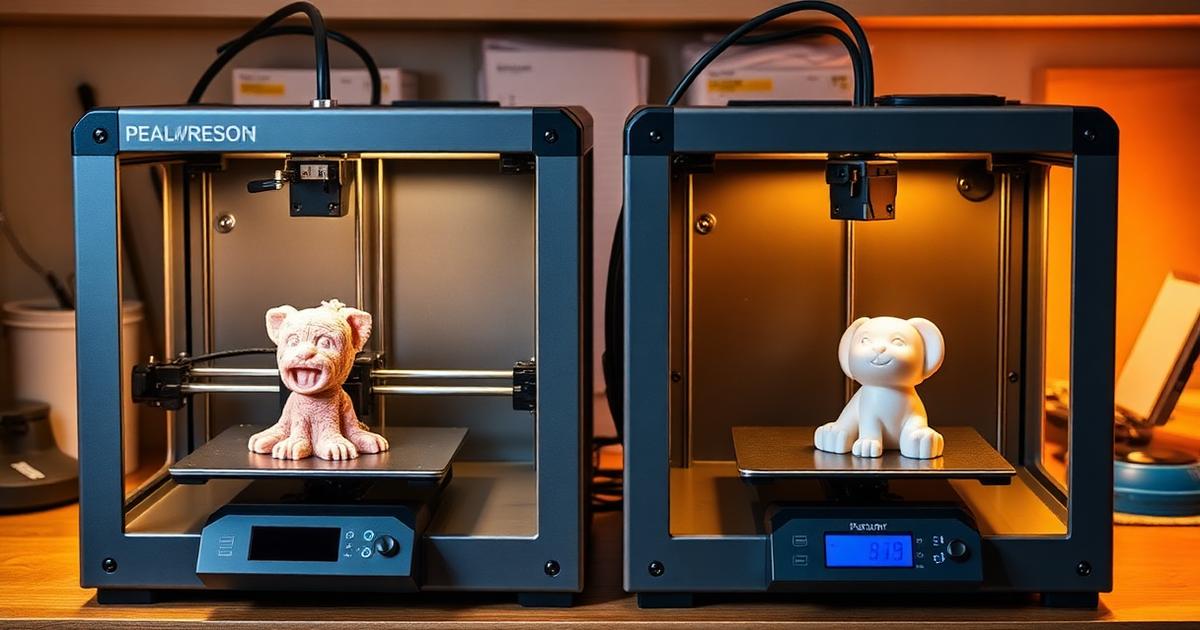
Let me give you a concrete comparison. Same model (a detailed tabletop miniature), same filament (Polymaker PolyTerra PLA), same slicer profile. Here's what happened:
Cheap Printer vs Mid-Range Printer — Real Results
Budget Printer
Best for: Tinkerers who enjoy fixing things more than printing
Mid-Range (Sovol SV06)
Best for: Anyone who actually wants to print things reliably
The $100 savings on a cheap printer gets eaten up by wasted filament, upgrade parts, and your time. The SV06 costs about the same when you factor everything in — and you'll actually enjoy using it.
The Effort Difference
With a cheap printer, that miniature can take three attempts, with hours of troubleshooting between each one, and the final result often still has visible layer issues on one side. Total time invested: around 9 hours for a 4-hour print.
With the SV06, loading the file, hitting print, and checking once after the first layer is often enough to finish perfectly on the first try. Total time invested: closer to 4 hours and 15 minutes.
That's not just a spec sheet comparison — it reflects the real difference in day-to-day use.
Using the right filament matters as much as the printer
A comparison of PLA brands and what actually delivers consistent, quality prints.
If You're Still Not Sure, Start Here
Spending money on something you're not sure about can be stressful. If you're going back and forth, here's a sensible approach:
- Read the full beginner guide — it breaks down every option at every price point, with specific recommendations based on your goals
- Set a budget around $250-$350 — this is the range where you get real features without overspending
- Don't buy upgrades for a cheap printer — if you're already thinking about what you'd need to add, buying a better printer instead usually makes more sense
My complete beginner's guide — every option, every price point
A step-by-step breakdown of exactly what to buy based on your budget and goals.
Can't decide between the SV06 and SV07?
A comparison of which one makes more sense depending on what you're printing.
What to Do If Starting Over
Starting from scratch, skipping the cheap printer entirely is usually the better move. Not because budget printers are terrible — they can teach a lot about how 3D printers work — but because the time, money, and frustration typically spent on them ends up costing more than just buying a mid-range printer from the start.
The Sovol SV06 hits the exact sweet spot. It's cheap enough that it doesn't feel like overcommitting, and good enough that printing stays enjoyable instead of turning into constant troubleshooting. For something a bit bigger or faster, the SV07 is also a solid option — but the SV06 is a strong starting point.
Don't overthink this. The best printer is the one that makes you want to keep printing. And for most people starting out, that's a reliable mid-range machine — not the cheapest thing on Amazon.
Ready to skip the cheap printer pain?
The SV06 is one of the best value 3D printers available. Get yours and start printing, not troubleshooting.
Get the Sovol SV06 — Best Value PickAlready printing but having adhesion issues? Fix it here
If prints won't stick, here's what actually works.
Best 3D Printer for Beginners (2025)
The ultimate beginner guide — our #1 money page
Best 3D Printer for Beginners (2025)
The ultimate beginner guide — our #1 money page
Frequently Asked Questions
Are cheap 3D printers worth it?
They can be if you want to learn the mechanics of 3D printing and don't mind tinkering. But for reliable, consistent results, a mid-range printer like the Sovol SV06 will save you money long-term. The filament you waste on failed prints with a cheap machine often costs more than the price difference.
Do expensive 3D printers print better?
Generally yes, but you don't need to spend a fortune. The biggest quality jump happens between $150 and $300. After $400-$500, you're paying for convenience features (multi-color, enclosed chambers) rather than dramatically better print quality. A $300 printer can produce prints nearly as good as a $1,000 machine.
What is the best budget 3D printer?
The Sovol SV06 is one of the best value options available. It includes auto bed leveling, a PEI build plate, all-metal hotend, and direct drive extruder — features that used to only come on $400+ printers. It's reliable enough that beginners can focus on learning to design and print rather than troubleshooting.
How much should I spend on my first 3D printer?
Plan to spend $250-$400. Under $200, you'll likely deal with constant calibration and failed prints. The $250-$400 range gives you modern features like auto-leveling and quality components that make learning much smoother. You can always upgrade later if you get serious about the hobby.
Why do cheap 3D printers fail so often?
Cheap printers use lower-quality components across the board: wobbly frames, inconsistent stepper motors, manual bed leveling that drifts, PTFE-lined hotends that degrade, and basic firmware without safety features. These issues compound — one bad component affects everything downstream, leading to adhesion failures, layer shifting, and rough surfaces.