Best PLA Filament for Lithophanes: What to Look For
By Chris Avery, Publisher / Editor
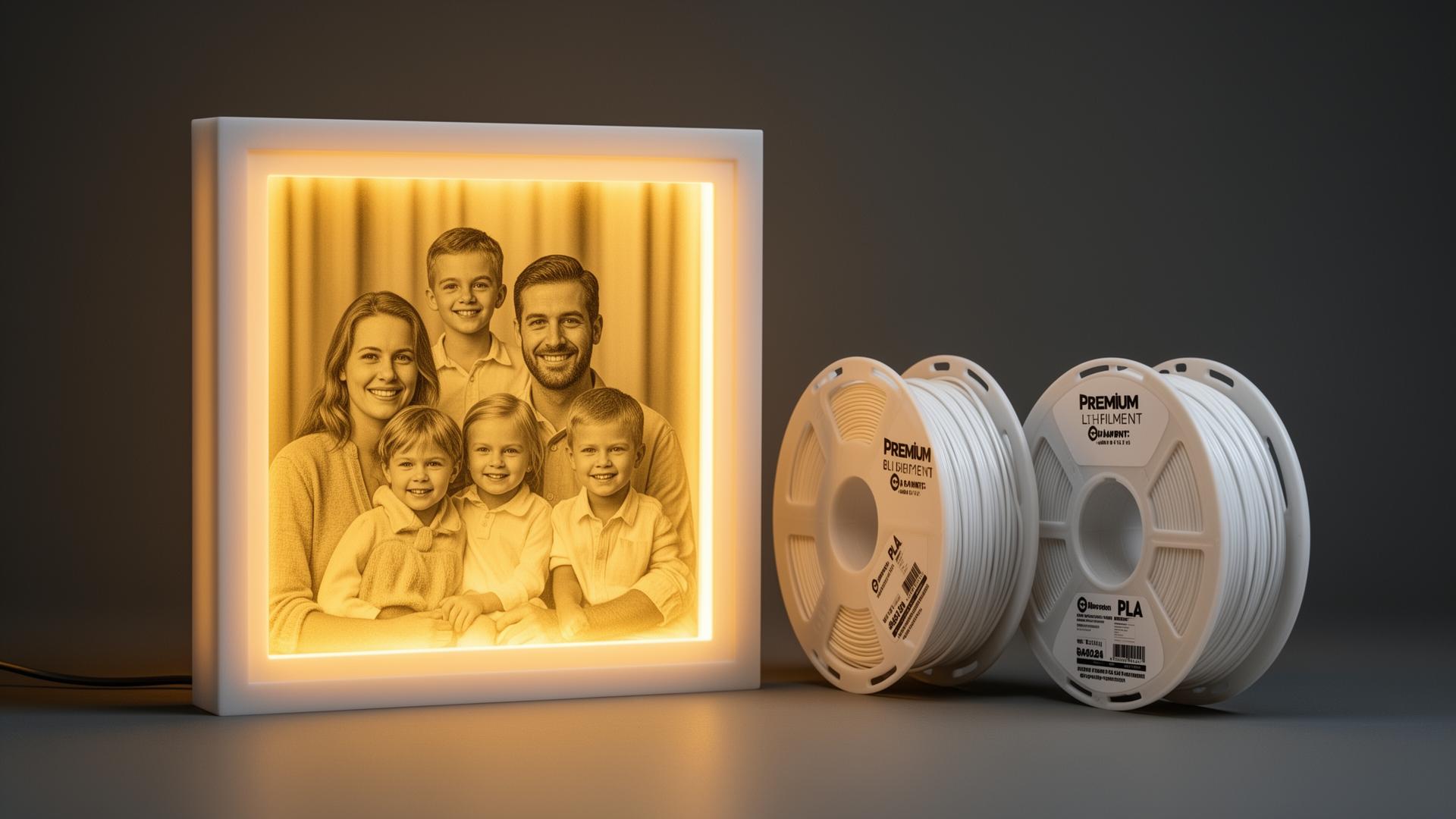
A lithophane is an image made out of thickness. Thin areas let more light through and read as highlights, thick areas block more light and read as shadows. That means the filament you choose does matter — but it matters because of colour, pigment and extrusion consistency, not because one spool is secretly "the lithophane filament".
This guide covers what to actually look for in a lithophane filament, which widely available PLA options are sensible starting points, what their manufacturers publish for print settings, and the other variables — thickness, layer height, orientation and backlighting — that decide how your finished piece looks.
Quick Answer: Which PLA for Lithophanes?
There is no single universal "best" lithophane filament. Traditional lithophanes use a light-coloured PLA, most commonly plain white or off-white, because the image is formed by differences in how much light passes through thicker and thinner material. Well-made, consistently extruded white PLA — for example Polymaker PolyLite PLA, eSUN PLA+ or SUNLU PLA+ — is a sensible starting point.
Beyond the spool, the result depends on filament colour and pigment, wall thickness, the lithophane model and its thickness range, layer height, printer calibration, and above all the light source behind the finished piece. Two people using the same filament can get very different images.
What Actually Makes a Filament Suitable for Lithophanes
Most general-purpose PLA can print a lithophane. The differences between spools show up in how the image reads once it is lit from behind.
Helps
- • A light, neutral colour so the image is not tinted
- • Enough pigment to create contrast between thick and thin areas
- • Consistent extrusion, so thickness differences come from the model
- • Dry filament — moisture causes bubbles and popping
- • Consistent colour between spools if you print matching sets
Complicates Things
- • Strongly warm or tinted "whites", which colour-cast the image
- • Silk and highly reflective finishes that compete with transmitted light
- • Fully transparent filament, where thickness differences matter less
- • Very dark or saturated colours, which block most of the light
- • Filament that has absorbed moisture or contains visible debris
Opacity, Translucency and Transmitted Light
These words get used interchangeably in lithophane discussions, and that causes a lot of confusion. A lithophane is not made of transparent material and it is not made of light-proof material. It is made of a partially light-transmitting solid, where the amount of light reaching your eye depends on how much material it had to pass through.
That is why "buy the most opaque white you can find" and "buy transparent filament" are both bad advice as general rules. If the filament blocks nearly all light, the bright parts of the image never open up and the panel looks dark and flat. If it transmits almost everything, the difference between a 0.8 mm thin section and a 3 mm thick section becomes much less visible and the image looks washed out. Ordinary pigmented white PLA sits between those extremes, which is the practical reason it became the default.
Manufacturers do not generally publish light-transmission figures for standard PLA, so treat any specific transmission number you see online as someone's measurement rather than a specification. Polymaker's published technical data sheet for PolyLite PLA, for instance, lists light transmission as not applicable.
White Versus Other Colours
White and other pale colours are the traditional choice for photographic lithophanes because they keep the image neutral. An off-white, cream or light grey spool will still work, but it shifts the overall tone of the finished piece — sometimes attractively, in a warm, ceramic-looking way.
Coloured lithophanes are entirely possible. A single strong colour turns the image into a monochrome study in that hue, and multi-colour or filament-change techniques can produce full-colour panels. Those approaches change the workflow substantially: you are now managing colour layering and backlight colour as well as thickness. If your goal is a recognisable photograph on your first attempt, start with a light neutral spool and experiment afterwards.
Best PLA Filament: The Wider Guide
Standard PLA, PLA+ and matte options compared for general printing
Sensible PLA Options for Lithophanes
None of these filaments is sold as a lithophane-specific product, and no manufacturer below claims their filament was designed for lithophanes. They are listed because they are widely available in white or light colours, and because their manufacturers publish print settings you can start from.
Polymaker PolyLite PLA (White)
A plain, standard PLA rather than a specialty formulation, which is exactly what most lithophane prints want. Polymaker describes it as designed for reliability and ease of printing, with no special requirements, and notes it is not intended for high-speed printing — not a problem here, since lithophanes are usually printed slowly anyway. Polymaker publishes a nozzle range of 190–230 °C, a bed range of 25–60 °C, cooling fan on, and drying at 55 °C for 6 hours if the filament has absorbed moisture.
Consideration: Polymaker has been moving stock between warehouses, so availability of specific colours varies.
Polymaker Panchroma Matte PLA (White)
This is the filament formerly sold as PolyTerra PLA; Polymaker rebranded the line to Panchroma Matte PLA. The matte surface scatters light at the face of the print, which softens layer lines and gives a more diffuse look, and the matting additives also change how light passes through compared with a glossy PLA. Polymaker publishes a nozzle range of 190–230 °C, bed 25–60 °C, speeds up to 300 mm/s, and notes the matte formulation is slightly more abrasive than regular PLA.
Consideration: matte and glossy versions of the same colour will not look identical at the same thickness — test a small piece before scaling up.
eSUN PLA+ (White)
A widely stocked, inexpensive modified PLA. eSUN states a dimensional tolerance of ±0.03 mm and positions PLA+ as tougher and less brittle than standard PLA, which is useful for thin-walled panels that get handled and mounted. It behaves like ordinary PLA on the printer.
Consideration: eSUN's white is a common choice, but as with any brand, check that the spool you receive matches earlier ones if you are printing a matching set.
SUNLU PLA+ (White)
Another high-volume budget option, commonly sold in multi-spool packs, which suits people printing lots of gift lithophanes. SUNLU's data sheet gives 205–215 °C at 50–100 mm/s, with 215–245 °C quoted for faster printing, a bed of 50–60 °C, a stated diameter tolerance of ±0.02 mm, and a drying temperature of 50 °C.
Consideration: the higher temperatures SUNLU quotes are tied to high-speed printing; for a slow, fine-layer lithophane, start at the lower end.
Comparison at a Glance
| Filament | Type / finish | Manufacturer nozzle guidance | Appearance consideration | Best suited for |
|---|---|---|---|---|
| Polymaker PolyLite PLA | Standard PLA, glossy | 190–230 °C, bed 25–60 °C | Neutral, conventional lithophane look | A straightforward first spool |
| Polymaker Panchroma Matte PLA | Matte PLA (formerly PolyTerra) | 190–230 °C, bed 25–60 °C | Diffuse surface, softer layer lines | Display pieces where finish matters |
| eSUN PLA+ | Modified PLA, ±0.03 mm stated | Standard PLA settings | Conventional white PLA appearance | Thin panels that get handled |
| SUNLU PLA+ | Modified PLA, ±0.02 mm stated | 205–215 °C at 50–100 mm/s, bed 50–60 °C | Conventional white PLA appearance | Printing many pieces at low cost |
Settings above are the manufacturers' published starting points, not lithophane-specific recommendations. No light-transmission or image-quality scores are given here because manufacturers do not publish them.
Matte, Gloss and Silk Finishes
Finish changes how the front face behaves, not just how it looks unlit. A glossy PLA reflects more light from the surface and shows layer lines more clearly; a matte PLA scatters that reflection, which many people find gives a cleaner-looking panel. Matting agents also sit in the material itself, so a matte spool and a glossy spool of the same nominal colour will not transmit light identically.
Silk PLA is the difficult case. Its appeal is a strong surface sheen, and that reflected shine competes with the transmitted light doing the actual work in a lithophane. It is not that silk PLA "cannot work" — it can be used deliberately for decorative panels — but it is not a sensible default for a photographic lithophane, and silk filaments are rarely offered in a neutral white.
How Silk PLA Behaves
Where a reflective silk finish helps, and where it works against you
Why Extrusion Consistency Matters Here
In a normal print, a slight variation in extrusion is cosmetic. In a lithophane it is part of the image, because the image is thickness. A short under-extruded stretch, a moisture bubble or a piece of debris in the melt becomes a visible bright or dark artefact when the panel is lit.
That is the honest case for caring about diameter tolerance and dry storage — not that a tighter-tolerance spool produces a measurably better photograph, but that inconsistency is more visible in this application than in most others. A well-calibrated extruder and properly stored filament usually matter more than the difference between a ±0.02 mm and a ±0.03 mm specification.
Filament Storage Containers
Keeping PLA dry between prints
Filament Dryers
What to do when a spool has already absorbed moisture
Layer Height, Nozzle and Orientation
Layer height
Finer layers reproduce more vertical detail, which is why lithophane profiles commonly sit somewhere in the 0.08–0.16 mm region rather than at a draft height. This is a starting range, not a rule: the right value depends on your nozzle, the model's thickness range and the size of the panel.
Nozzle
A 0.4 mm nozzle prints the large majority of lithophanes perfectly well. A 0.2 mm nozzle can resolve finer horizontal detail, at the cost of much longer prints and more sensitivity to clogging. No nozzle size is required.
Orientation
Panels are usually printed standing upright so the image face is not marked by build-plate texture and the printer's horizontal resolution works across the image. It is a strong default rather than a universal law — some framed or curved designs are made to print differently, so follow the model's own guidance where it exists.
Solidity
Lithophanes need to print solid, with no internal voids, because any gap changes how much light passes through that spot. Most lithophane generators and profiles handle this for you.
Dialling In Print Temperature
How to find a working temperature for a specific spool
The Backlight Matters as Much as the Filament
People often blame the filament for a disappointing lithophane when the problem is the light behind it. A dim source leaves the whole panel muddy. A single bright point source can create a hotspot and uneven illumination across a large image. A very warm or very cool light shifts the colour of the finished piece, which is especially noticeable on an off-white filament.
In practice, a reasonably bright, diffuse light placed a little way back from the panel gives the most even result, and thicker panels need more light than thin ones. Exact brightness and distance depend on your light and your model, so it is worth trying one lithophane against a couple of different sources before deciding a spool is the problem.
Why PLA, and What Else Works
PLA dominates lithophane printing because it prints reliably at fine layer heights and slow speeds, needs no enclosure, is cheap, and is sold in more light, neutral colours than almost any other material. None of that makes it the only option. PETG and other materials can also transmit light and can be used, though they print differently and their surface and light behaviour will not match PLA.
One genuine PLA limitation is heat. PLA softens at relatively low temperatures, so a lithophane pressed against a hot lamp, sitting in direct summer sun or left in a car can deform. If the display setup runs warm, that is the main reason to look at another material.
Filament Types and Uses
How PLA, PETG, ABS and the rest compare across applications
Frequently Asked Questions
What PLA is best for lithophanes?
There is no single universal best lithophane filament. Most people start with a plain white or off-white PLA because the image is formed by how much light passes through thicker and thinner areas of the print. Standard PLA such as Polymaker PolyLite PLA, eSUN PLA+ or SUNLU PLA+ in white are all common starting points. The filament matters, but wall thickness, the lithophane model itself, layer height, printer calibration and the light behind the finished piece all affect the result too.
Is white PLA best for lithophanes?
White and other light colours are the traditional choice because pigment absorbs light. A light filament lets enough light through the thin areas for the bright parts of the image to read clearly, while the thicker areas stay darker. Off-white or warm white filament can tint the finished image, which some people like and others do not. Coloured and multi-colour lithophanes are possible, but they change how the image reads and usually need a different workflow.
Should lithophane filament be opaque or translucent?
Neither extreme is the goal. A lithophane relies on partial light transmission through solid material, so you want a filament that blocks enough light to create contrast but still transmits light through thin sections. A heavily pigmented, very light-blocking filament can look flat and dark, while a clear or highly transparent filament can wash the image out because the thickness differences matter less. Ordinary white PLA sits in a useful middle ground, which is why it is so widely used.
Can you use matte PLA for lithophanes?
Yes, and many people do. A matte finish scatters light at the surface, which can soften layer lines and give a more diffuse look. The matting additives also change how much light passes through, so a matte filament will not behave identically to a glossy one at the same thickness. Polymaker's Panchroma Matte PLA, previously sold as PolyTerra PLA, is one widely available matte option. Print a small test before committing to a large piece.
Can you use silk PLA for lithophanes?
Silk PLA is generally a poor first choice for a traditional photographic lithophane. The finish is designed to reflect light from the surface, which tends to compete with the transmitted light that forms the image, and silk filaments are usually strongly coloured. It is not impossible, and it can be used deliberately for decorative panels, but it is not the straightforward option that a plain light PLA is.
What nozzle size is good for lithophanes?
There is no universally required nozzle size. A 0.4 mm nozzle is the standard fitted to most printers and is used for the large majority of lithophanes. A smaller nozzle such as 0.2 mm can resolve finer horizontal detail at the cost of much longer print times and more sensitivity to clogs and moisture. If you are starting out, use the nozzle already on your printer and adjust the model and layer height first.
What layer height should I use for lithophanes?
Finer layers generally reproduce more vertical detail, which is why many lithophane profiles sit in the roughly 0.08 mm to 0.16 mm range rather than at a coarse draft height. The right value depends on your nozzle, printer, the model's thickness range and how large the finished piece is. Treat these as starting points and test on a small crop of the image rather than following a fixed rule.
Should lithophanes be printed vertically?
Printing the panel standing upright is the common approach, because the printer's horizontal resolution and the layer stack then line up with the image detail, and the flat face is not marked by build-plate texture or supports. It is a well-established default rather than a guarantee: some models, printers and framed designs are made to print another way. Follow the guidance that comes with the model where it exists.
Can you print lithophanes with PETG?
Yes. PLA is the usual choice because it is easy to print at fine layer heights, holds detail well and is available in many light colours, but it is not the only material that can transmit light. PETG and other materials can be used, and they will behave differently in terms of light transmission, surface finish and print settings. If the piece will sit near a warm light source or in a hot car, PLA's low heat resistance is worth considering.
Does filament brand matter for lithophanes?
Consistency matters more than the name on the spool. Because a lithophane image is made of small thickness differences, uneven extrusion, moisture-related bubbles or debris in the filament can show up as visible artefacts when the piece is backlit. Any well-made filament stored dry and printed on a well-calibrated machine can produce a good lithophane, and no brand can be claimed to produce measurably better images without direct comparison testing.
Bottom Line
Buy a light, neutral PLA from a maker that publishes real print settings, keep it dry, and spend your effort on the model, the layer height and the backlight. A plain white standard PLA such as Polymaker PolyLite PLA is a reliable starting point; a matte option like Panchroma Matte PLA is worth trying if you prefer a diffuse surface; eSUN PLA+ and SUNLU PLA+ are inexpensive choices when you are printing a lot of panels.
What you should not do is chase a magic spool. Nobody can promise perfect contrast from a filament choice, because the finished image depends on the model, the printer and the light behind it at least as much as on the material.